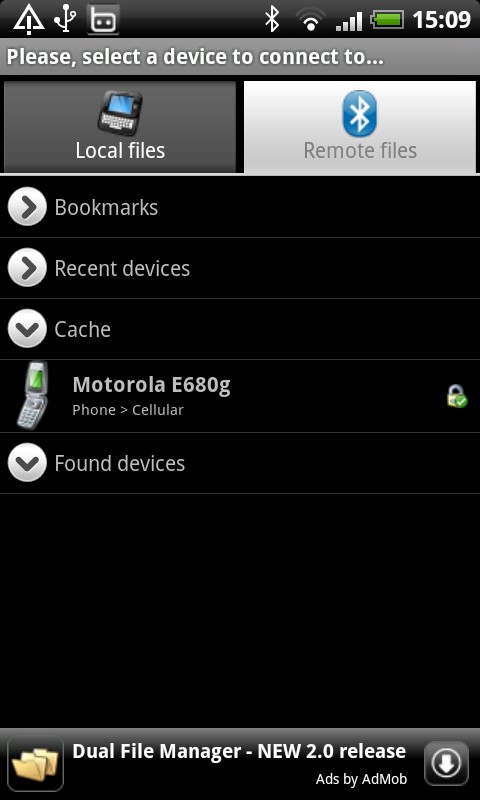
Bluetooth File Transfer 5.32's Description
Use your smartphone to browse, explore and manage files of any
Bluetooth ready device, using File Transfer Profile (FTP) and Object
Push Profile (OPP): you can also receive files and send contacts!
GUIDE> http://help.medieval.it (by Absolutely Android)
FEATURES>
* Custom security manager for incoming BT connections: only authorized devices can connect, if you accept. If you refuse, no access is granted on your servers: personal data files and privacy are safe against hacker, nerd, geek and guru (enanched Bluetooth server security is disabled by default)
* 3rd party applications can open (or pick) files from sdcard using this package like attachment, music, pictures or any multimedia file (no external intents are supported for performance purpose)
* Support for legacy 2.0 and AES (128, 192 and 256 bit) encryption (both pack and unpack) of Zip files (like WinZIP or WinRAR) - keep private document secure using a long pass to protect it
* Enhanced all-in-one app with the fastest file browser ever seen (you can verify by yourself, test it now)
* Professional, clean and fast UI where you can customize any aspect of the file viewer. Customizable user interface in order to best fit your needs (expert only)
* Thumbnails for APK, audio, video, image (also inside archive files: Zip, GZip, TAR) - thumb picture (miniature) not stored on cell phone memory
* It can connect to new and old cellphone: nokia, samsung, lg, sony (Android does not support infrared IR pan)
* Search files also inside Zip, GZ, Tar (advanced searching inside archive can take double time to complete)
* Improved contact send function in order to manipulate telephone numbers on generated VCARD (vcf) files
* Cut, copy, move, paste, delete multiple items using the integrated explorer of this application
* You can full unhide (or hide) hidden media (both smartphone and sd memory)
* OBEX layer (obexftp and obexopp) entirely developed by Medieval Software
* Compress, uncompress and extract Zip (encrypt with password), GZip, Tar
* Cleaner program settings view using shortcut icons pane
* Sharing: you can share a single file or an entire path
* Powerful bookmark feature with precise sorting
* Contact send screen supports contacts groups
* Test and check archive integrity (deflate)
* Desktop folders shortcuts
* Calculate MD5 and CRC32
* Power saving management
* Streaming service
* No root required
* Multi language
* Multiselect
* Home folder
* File sort
* Open as
Freeware with AD (free software) - You can now remove advertising from this application by purchasing "Medieval Licensing System" on the Android Market!
NOTE - SDPD (uuid port route) may not work on Android 1.5 and 1.6 so friend services could not reach you!
---
FAQ> Why "Bluetooth File Transfer" requires the contact read permissions?
A. In order to send your contacts over Bluetooth, if you wish, for example to your car-kit or to another smartphone. Open main menu, select Send contacts item, put a check beside the contacts you would like to send and finally press Send button.
Recent changes:
Version 5.32:
* The folder hierarchy is now preserved when items are sent via Bluetooth OPP;
* Minor bug fixes.
Version 5.31:
* Ready for Android Jelly Bean (or above).
Version 5.30:
* Improved licensing system.
Version 5.20:
* Added Korean language;
* Fixed Android 1.5 bug.
Version 5.10:
* Added Hebrew language;
* Added Arabic language;
* Minor bug fixes.
Version 5.00:
* Improved licensing system.
NOTE - You must update "Medieval Licensing System" to version 1.10
Content rating: Everyone
GUIDE> http://help.medieval.it (by Absolutely Android)
FEATURES>
* Custom security manager for incoming BT connections: only authorized devices can connect, if you accept. If you refuse, no access is granted on your servers: personal data files and privacy are safe against hacker, nerd, geek and guru (enanched Bluetooth server security is disabled by default)
* 3rd party applications can open (or pick) files from sdcard using this package like attachment, music, pictures or any multimedia file (no external intents are supported for performance purpose)
* Support for legacy 2.0 and AES (128, 192 and 256 bit) encryption (both pack and unpack) of Zip files (like WinZIP or WinRAR) - keep private document secure using a long pass to protect it
* Enhanced all-in-one app with the fastest file browser ever seen (you can verify by yourself, test it now)
* Professional, clean and fast UI where you can customize any aspect of the file viewer. Customizable user interface in order to best fit your needs (expert only)
* Thumbnails for APK, audio, video, image (also inside archive files: Zip, GZip, TAR) - thumb picture (miniature) not stored on cell phone memory
* It can connect to new and old cellphone: nokia, samsung, lg, sony (Android does not support infrared IR pan)
* Search files also inside Zip, GZ, Tar (advanced searching inside archive can take double time to complete)
* Improved contact send function in order to manipulate telephone numbers on generated VCARD (vcf) files
* Cut, copy, move, paste, delete multiple items using the integrated explorer of this application
* You can full unhide (or hide) hidden media (both smartphone and sd memory)
* OBEX layer (obexftp and obexopp) entirely developed by Medieval Software
* Compress, uncompress and extract Zip (encrypt with password), GZip, Tar
* Cleaner program settings view using shortcut icons pane
* Sharing: you can share a single file or an entire path
* Powerful bookmark feature with precise sorting
* Contact send screen supports contacts groups
* Test and check archive integrity (deflate)
* Desktop folders shortcuts
* Calculate MD5 and CRC32
* Power saving management
* Streaming service
* No root required
* Multi language
* Multiselect
* Home folder
* File sort
* Open as
Freeware with AD (free software) - You can now remove advertising from this application by purchasing "Medieval Licensing System" on the Android Market!
NOTE - SDPD (uuid port route) may not work on Android 1.5 and 1.6 so friend services could not reach you!
---
FAQ> Why "Bluetooth File Transfer" requires the contact read permissions?
A. In order to send your contacts over Bluetooth, if you wish, for example to your car-kit or to another smartphone. Open main menu, select Send contacts item, put a check beside the contacts you would like to send and finally press Send button.
Recent changes:
Version 5.32:
* The folder hierarchy is now preserved when items are sent via Bluetooth OPP;
* Minor bug fixes.
Version 5.31:
* Ready for Android Jelly Bean (or above).
Version 5.30:
* Improved licensing system.
Version 5.20:
* Added Korean language;
* Fixed Android 1.5 bug.
Version 5.10:
* Added Hebrew language;
* Added Arabic language;
* Minor bug fixes.
Version 5.00:
* Improved licensing system.
NOTE - You must update "Medieval Licensing System" to version 1.10
Content rating: Everyone
Bluetooth File Transfer 5.32's Screenshots